 By Miles Sinclair
Updated November 2026
Apps for potty training can help you track bathroom trips, build a predictable routine, and spot patterns in your toddler’s accidents, but they work best as a support tool rather than a replacement for steady, consistent practice. In this guide, you will learn what to look for in a potty training app, how to set one up for a child aged roughly 18 months to 4 years, and how to use the data it collects without turning every trip into a test.
What Apps for Potty Training Can and Cannot Do
Most potty training apps are built around three jobs: reminding a parent to offer the potty, logging successes and accidents, and rewarding progress with stickers, charts or simple games. Some add timers, visual schedules or short videos that show a child what to do. A few connect to a shared calendar so caregivers such as grandparents or daycare staff can follow the same plan.
Shopping for one? See our guide: Undies for Potty Training: 7 Best Picks for Toddlers (2026).
What an app cannot do is teach bladder and bowel control. Readiness depends on physical signs, such as staying dry for two hours or more, and on emotional readiness, such as the willingness to sit on the potty. If your child is not showing those signs yet, an app will mostly create frustration. For more on timing, see When to Start with Potty Training: Signs Your Toddler Is Ready (2026) and Signs to Start Potty Training: 7 Readiness Clues for Toddlers.
Choosing the Right App
Pick an app based on the problem you are trying to solve. A parent who simply forgets to offer the potty needs reminders. A parent whose child has frequent accidents needs logging that shows patterns. A parent working with several caregivers needs shared access. Check these features before you download anything:
- Adjustable reminder intervals. Many toddlers do well with a prompt every 30 to 60 minutes while awake, then less often as they gain control.
- Simple, one-tap logging. If logging takes more than a few seconds, you will stop doing it within a week.
- Visual rewards that the child can see. Stickers, star charts or animated characters work better for toddlers than points or percentages.
- Offline use. Bathroom trips happen at home, in the car and at the park. An app that needs constant internet is inconvenient.
- Privacy settings. Check what data is collected and whether you can delete it. Review the developer’s privacy policy before you create an account.
- No pressure mechanics. Avoid apps that shame accidents with red marks or timers that count down toward a deadline.
Setting Up a Potty Training Routine With an App
Step 1: Prepare the child and the environment
Before you open an app, set up a potty that the child can use without help, such as a small seat or a sturdy step stool at the sink. Let your toddler pick out underwear or a training pant. Show them the potty and explain the basic steps in short sentences: pull pants down, sit, go, wipe, flush, wash hands.
Step 2: Set a starting schedule
Most families start with a prompt every 45 to 60 minutes during waking hours, plus prompts after meals, after naps and before leaving the house. Set the app to match this rhythm. Keep the first week simple. Changing the schedule every day makes it hard to read the results.
Step 3: Log everything for one to two weeks
Record each attempt, whether or not your child goes. Note whether the trip was a success, a partial success or an accident. Also note any notable details, such as a child who refused the potty or had constipation. After one to two weeks, look for patterns. Many children have a predictable time when they are most likely to have an accident, such as right after play or before bed.
Step 4: Adjust based on the data
If accidents cluster around a certain activity, move a prompt earlier. If your child succeeds most often after a snack, offer the potty right after snacks. If a particular day is consistently difficult, consider whether illness, a schedule change or a new caregiver might be the reason. For tips on sitting time, see When Potty Training, How Long to Sit on Potty? A Practical Guide.
Step 5: Reward progress, not perfection
Give the reward for effort and for trying the potty, not only for dry pants. A sticker for sitting on the potty and staying calm is a good early reward. Later, reward longer dry stretches. For ideas on what to use, see Rewards for Potty Training: A Step-by-Step Guide for Toddlers.
Tools and Supplies That Support App-Based Training
| Tool | Purpose | Best for |
|---|---|---|
| Potty app with reminders | Prompts and logging | Parents who forget to offer the potty |
| Visual schedule or chart | Shows the routine in pictures | Children who respond to visual cues |
| Timer | Sets sitting time | Keeping sessions short and calm |
| Training underwear | Gives the child a clear feeling of wetness | Children moving past diapers |
| Mattress protector | Protects bedding during night accidents | Nighttime training |
Some parents also use a simple paper calendar alongside their app. That is a reasonable backup if the phone is not nearby. For visual aids beyond apps, see Visual Potty Training Aids: 5 Tools That Help Toddlers Learn (2026).
Common Mistakes
- Using the app as a test. Toddlers pick up on disappointment quickly. Keep your tone neutral when you check the screen.
- Logging only the wins. Accurate records of accidents are what make the data useful.
- Starting too early. If your child resists sitting or shows no signs of readiness, pause and try again in a few weeks.
- Too many reminders. Prompts every 10 minutes lead to a child who sits constantly and stops listening to the body. Space them out.
- Ignoring constipation. Hard stools cause pain and fear of the potty. If your child strains, skips days or has painful bowel movements, talk with your pediatrician.
- Expecting one caregiver to do everything. If grandparents or childcare staff use different prompts, results will be uneven. Share the same schedule.
Tips for Getting the Most From an App
- Show your child the app’s characters or stickers and let them choose one or two favorites.
- Keep sessions to three to five minutes so the potty stays a quick, low-stress stop.
- Review the logs once a week, not every day, to avoid overreacting to small setbacks.
- Turn off the app’s reminders on days your child is sick or traveling, and resume when things settle.
- Stop or pause if your child becomes distressed. You can return to training later with less pressure.
Recommended gear
Several non-app items often make app-based training easier, especially during the first few weeks.
- Potty training toilet seat ladder: A ladder with a seat lets a toddler reach a standard toilet independently and reduces the need for help at each trip. View on Amazon
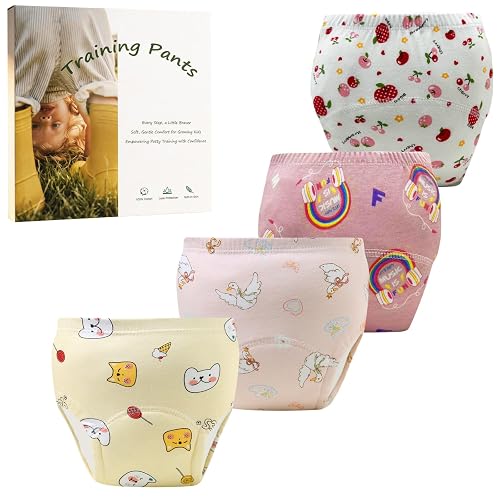
- Training underwear for toddlers: Thick training pants make wetness easy to feel, which supports the link between accidents and the potty routine. View on Amazon
- Waterproof mattress protector: A protector keeps bedding dry while you work on nighttime control, which often comes last. View on Amazon
FAQ
Are apps for potty training effective?
Apps can help with consistency, reminders and tracking, which many parents find useful. They do not change a child’s readiness. Results depend mostly on the child’s physical and emotional readiness and on steady, calm practice.
What age should I start using a potty training app?
Many families begin between about 18 months and 3 years, once a child shows readiness signs. Some children are ready earlier or later. Use the app only after you see signs that your toddler is ready to try.
Should I use an app and a visual chart together?
Yes, many families do. A visual chart on the wall helps a toddler see progress, while the app handles reminders and logging for the parent. Keep the rewards consistent between the two so the child is not confused.
How often should the app remind me to offer the potty?
A common starting point is every 45 to 60 minutes while awake, plus after meals, naps and before leaving the house. Adjust based on your logs. Fewer prompts often work better once your child starts going on their own.
What should I do if my child is scared of the potty?
Pause the app for a few days and let the child explore the potty without pressure. Read books about potties, let them flush, and offer sitting on the potty fully clothed. If fear continues or you suspect constipation or pain, talk with your pediatrician.
Can I use an app for nighttime training?
Some apps include night logging, but nighttime dryness usually develops later than daytime control and depends on body development. Limiting fluids before bed and using a waterproof mattress protector are common steps. Consult your pediatrician if bedwetting continues past age 5 or stops after a period of dryness.
Do I need to share my child’s data with anyone?
No. Many apps store data on your device or in an account you control. Review the privacy policy and settings before you create an account, and delete data you no longer need.
Conclusion
Apps for potty training can make routines easier to follow, reveal useful patterns and keep caregivers on the same page. Choose an app that matches your main problem, log honestly for a week or two, and adjust based on what you see. Keep the tone calm and the rewards focused on effort, and check with your pediatrician if you have concerns about constipation, pain or lasting accidents.
Ready to choose one?
About Miles Sinclair
Miles Sinclair is part of our editorial team and reviews and edits our toddler development & behavior guides, checking product details against manufacturer specifications and owner feedback.